Poseit
- 3.9
- Rating
- 1.00M
- Installs
- Free
- Price
 Analysis by App-foxy
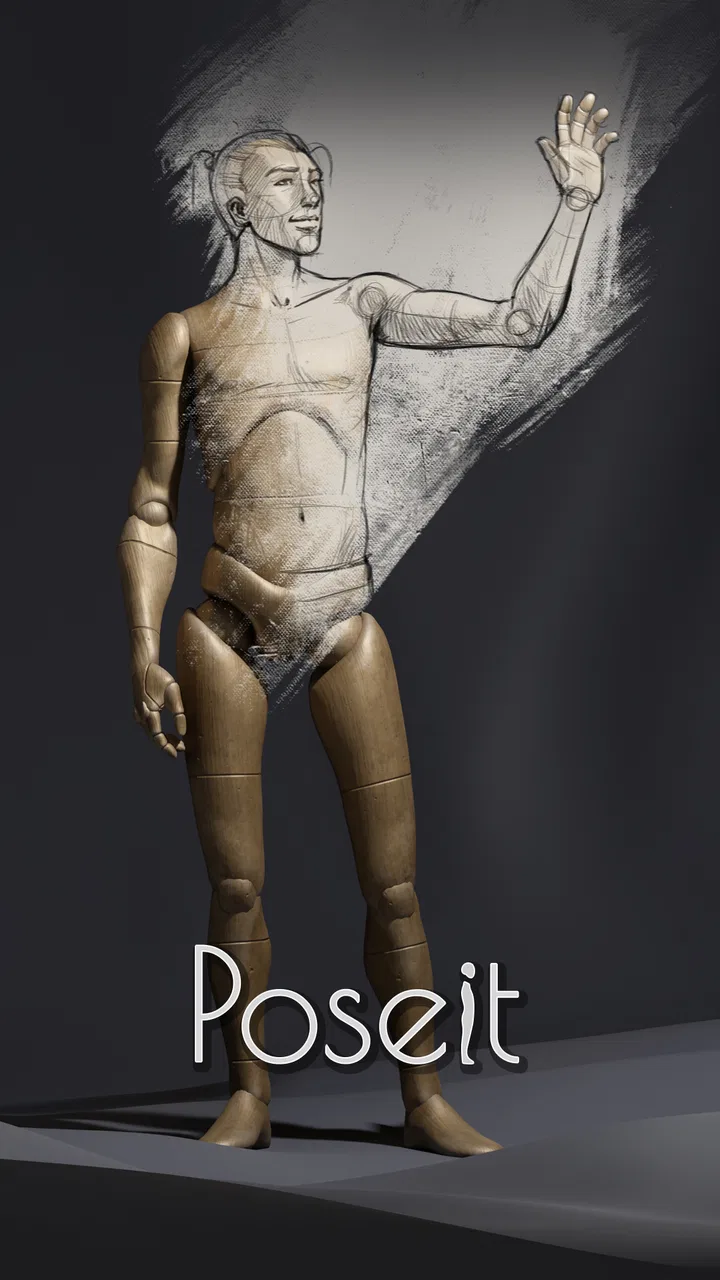
When I want to practice drawing people, the hardest part is often not the face, hands, or clothing. It is getting the whole body to feel balanced before I start adding details. Poseit approaches that problem with a digital mannequin that I can adjust before putting pencil or brush to paper. In my experience, that makes it especially useful as a quick planning tool for figure studies, character sketches, comics, and illustration thumbnails.
It is a free art and design app from 1ManBand, rated for Everyone, and it runs on devices using Android 7.1 or later. The current build is version 2.2.3. The app has reached more than a million installs, with an average rating of 4.0 from roughly 8,600 ratings, so it has clearly found an audience among people who want a practical reference rather than a full drawing studio.
I would not describe it as a replacement for a complete digital art package. Its value is narrower and, in a way, more useful: it gives me a movable body reference that I can arrange quickly, inspect from different angles, and use to understand proportion and gesture. If you regularly freeze at the blank page because you cannot decide how a figure should stand, this is the kind of focused tool that can remove that first obstacle.
You May Also Like

 Blood Strike: 2.5 Anniversary
Blood Strike’s Loadouts Turn Every Drop Into a Tactical Gamble
A close look at Blood Strike’s custom loadouts: how fast access to signature weapons reshapes its battle royale rhythm, rewards preparation, and narrows the gap between fights.

 Pandora - Music & Podcasts
Pandora’s Music Is Easy to Start, but Harder to Recover
Pandora’s strength is its low-effort path from a seed to a station. Its weak spot is how much confidence it asks you to place in connection, setup, and quiet recovery.

 8 Ball Pool
 Is Built on Rivalries, Rematches, and Routine
A close look at the rivalries, rematches, shared routines, and unanswered safety questions that turn a quick pool match into a persistent mobile community.

 Samsung Music
’s Quiet Strength Is Playing What You Already Own
Its reach comes less from spectacle than from dependable access to a personal library. That simplicity is both the app’s strongest retention engine and its ceiling.

 AccuWeather: Weather Radar
AccuWeather Review: A Quick, Clear Forecast for Everyday Decisions
For everyday plans, the best forecast is the one you can understand quickly. AccuWeather makes rain timing, radar, and local conditions easy to act on, with a few trade-offs.

 Hill Climb Racing
Why Hill Climb Racing Still Turns Crashes Into One More Run
A tiny car, a bumpy hill and one more upgrade: Hill Climb Racing keeps resurfacing because its simple chaos makes every near-miss feel personal.
More From Our News Desk



How the current Poseit experience fits into an artist’s workflow
I’d look at Poseit as a shared reference tool for a household where different people sketch on the same device: one person can use it to plan a comic panel, while another studies a simple standing pose. I’d keep the reference task distinct from each person’s drawing app or notebook, then consider how to make that handoff clear before deciding whether it suits everyone at home.
A reference tool rather than a complete art studio
The most important thing to understand is where this app belongs in a normal drawing process. I use it before the drawing itself, not instead of the drawing. I can set up a pose, study the direction of the torso and limbs, and then move that information into a sketchbook or another illustration app. That separation keeps the workflow simple: Poseit handles the body reference, while my usual tools handle lines, color, layers, and finishing.
This also makes it useful for artists who already have a favorite drawing app. I do not need to abandon a familiar brush engine just to get a better pose reference. I can keep the mannequin open while planning a scene, or use the arrangement as a starting point and then redraw it with more personality. The mannequin is a guide, not a finished character, and that distinction prevents the result from looking stiff or overly dependent on the model.
For beginners, the benefit is immediate. Instead of trying to invent a convincing standing or seated figure from memory, I can first look at the large shapes: the angle of the shoulders, the tilt of the pelvis, the weight carried by each leg, and the path of the spine. Those observations are more valuable than simply tracing an outline because they teach me why a pose works.
Why a movable mannequin helps with gesture
A photograph can show a realistic person, but it is not always easy to find the exact action or camera angle I need. A static reference can also contain distracting clothing, lighting, or background details. A digital mannequin strips the scene down to structure. That makes it easier for me to focus on movement and balance before worrying about anatomy.
One useful habit is to spend less time adjusting small joints and more time checking the pose as a silhouette. I first look at whether the figure communicates an action from a distance. If the answer is no, refining the fingers will not rescue it. Poseit works well for this kind of broad check because the model gives me an immediate visual target for the gesture.
I also find it helpful to rotate the reference instead of accepting the first view that looks attractive. A pose that seems convincing from the front may reveal awkward limb placement from the side. Checking another angle exposes problems early, especially when I am preparing a character who will appear in a sequence of panels or illustrations.
A practical everyday scenario
Imagine I have twenty minutes before work and want to sketch a person leaning against a wall while looking at a phone. Searching for a matching photograph could take longer than the sketch. With Poseit, I can build the broad action, place the arms near the torso, shift the legs into an uneven stance, and use that arrangement as a quick reference. I can then save the drawing in my normal app or notebook without spending the entire session hunting for an image.
That same workflow is useful for a comic artist planning a panel. I can create a rough pose for each character, compare their heights and directions, and make sure the scene reads before investing in clean line work. For a student, the app can turn an abstract anatomy exercise into a repeatable routine: choose a pose, identify the major masses, draw it from observation, and then try the same action without looking.
What makes it different from photographs and pose libraries
Compared with a photograph, a mannequin gives me control over the pose rather than asking me to adapt my idea to an existing image. Compared with a collection of ready-made poses, it is better suited to situations where the exact arrangement matters. I can think about the action I want first and then construct a reference around it.
The trade-off is realism. A mannequin does not automatically provide the subtle compression, muscle tension, fabric behavior, or individual character that a good photograph shows. I still need to use anatomy knowledge and visual judgment. For realistic portrait work, clothing studies, or lighting practice, a photo reference is often the better choice. For blocking a pose and understanding its mechanics, this app is more convenient.
Small workflow choices that improve the result
My first tip is to establish the line of action before adjusting every body part. I imagine a single curve running through the figure, then arrange the torso and limbs so they support that movement. This prevents the common mistake of building a technically assembled body that still feels lifeless.
My second tip is to use the mannequin as a three-dimensional checkpoint, not as a tracing template. I make a quick sketch from the reference, hide or move my attention away from the model, and then redraw the same pose from memory. The comparison shows whether I understood the structure or merely copied the contour. That turns a convenient pose generator into a genuine learning exercise.
A third useful approach is to exaggerate the pose briefly. If I am designing a dynamic character, I push the torso twist or the leg angle further than the final drawing may require. This helps me see the gesture clearly, after which I can reduce the exaggeration while keeping the energy. It is a better use of the app than searching endlessly for a perfect natural pose.
How the product’s evolution matters
The current version, 2.2.3, shows that the app is still being presented as an active, focused tool rather than an abandoned experiment. I would be careful, however, not to treat a version number as proof that every artist will find the interface complete. What matters in daily use is whether the controls let me make a pose without interrupting my thinking.
For someone who used an earlier release, the practical question is whether the present build feels dependable enough for regular reference work. My advice is to judge it by a short real project: create a standing pose, a seated pose, and a more active pose, then see whether each can be adjusted without frustration. That test tells me more than assuming that a newer build automatically solves every limitation.
The app’s long-term appeal comes from its focused identity. It does not need to become a giant illustration suite to be useful. Improvements that make posing clearer, viewing angles easier to inspect, and references simpler to reuse would directly strengthen the reason people install it in the first place.
What existing users may notice
If I already draw on a phone or tablet, Poseit can fit beside my established setup without forcing a major change. I can use it when inspiration arrives away from the desk, then transfer the idea into a larger workflow later. That is particularly convenient for thumbnails, travel sketches, and quick composition tests.
Existing users should also remember that a mannequin can encourage overconfidence. A correct-looking pose is not the same as correct anatomy. The model helps with placement and perspective, but it does not make decisions about character design, expression, clothing, foreshortening, or visual storytelling. I still need to simplify, exaggerate, and interpret what I see.
Another point is consistency. If I use the app for a comic or a sequence, I should keep notes about camera angle, body proportions, and the intended action. A pose reference is helpful only when I can reproduce the visual logic from one image to the next. The app can support that process, but it cannot organize the entire project for me.
Where the experience still has limits
The biggest limitation is the gap between a mannequin and a living subject. Bodies do not move like perfectly articulated wooden figures. Weight shifts through the feet, joints compress, muscles stretch, and hands often become the most expressive part of an action. I can use Poseit to solve the broad structure, but I still need photographs, observation, or anatomy study for those finer decisions.
It is also not the right choice if my main goal is polished digital painting. The app belongs at the reference stage, while a full drawing application offers the brushes, layers, selection tools, and color controls needed for production. Using Poseit alone will not give me a finished illustration workflow.
The free price makes experimentation easy, but in-app purchases range from $0.99 to $7.99 per item. I would therefore treat the free experience as a chance to decide whether the posing method suits me before spending anything. The purchase model is not automatically a problem, but artists should consider whether the available tools justify adding paid items to a workflow they may only use occasionally.
There is also a learning curve in the very thing that makes the app flexible. A movable mannequin can be more useful than a fixed pose gallery, but it asks me to make decisions. If I want a single ready-to-copy image with no setup, a photo search or a pose reference collection may be faster. Poseit becomes more worthwhile when I need control over the arrangement or want to practice constructing poses myself.
Who should use it and who should skip it
I would recommend it to beginners learning gesture and proportion, comic artists blocking panels, character designers testing silhouettes, and hobbyists who need a quick figure reference on a mobile device. It is especially suitable for people who often know what their character should be doing but cannot visualize the body position clearly.
I would be more cautious about recommending it to artists whose work depends heavily on realistic anatomy, natural hand positions, fabric folds, or photographic lighting. Those users will likely get more from a strong photo reference library, life-drawing sessions, or a specialized anatomy resource, with Poseit used only for rough blocking.
It may also be unnecessary for someone who already has a reliable 3D reference workflow on a larger screen and rarely sketches away from it. The app’s advantage is convenience and focus. If another tool already solves those needs with less friction, installing another reference program may not improve the process.
What I would watch in future use
When I evaluate an app like this over time, I look for improvements that preserve speed rather than adding complexity for its own sake. Clearer manipulation, dependable viewing from different angles, and an easier path from pose setup to drawing would matter more to me than a long list of unrelated creative features.
I would also watch how well the app serves both learning and production. Beginners need controls that are easy to understand, while experienced artists need enough precision to build unusual poses quickly. The best future direction would support both without turning a simple reference tool into a crowded interface.
For now, my expectation is realistic: this is a focused aid for solving the first stage of figure drawing. It can help me get unstuck, test an action, and study the relationship between body parts, but it cannot replace observation or artistic interpretation. That honest boundary is important because it explains both its usefulness and its limits.
My final take on the free download
Poseit is worth trying if your main problem is placing a figure, not finishing one. I like it as a compact planning companion because it turns an uncertain pose into something I can inspect and revise. The free entry point makes it easy to test, and the Everyone age rating keeps it approachable for a broad range of learners and artists.
My recommendation is to use it actively: build a pose, study the gesture, draw from it, then redraw without the reference. That method gives the app more educational value than simply copying the outline. I would keep a photo source nearby for anatomy and natural movement, and I would use a full illustration app for the final artwork.
With that role clearly understood, the app makes sense. It is not a magic anatomy teacher or a complete studio, but it is a practical digital mannequin for the moment when a blank page needs a believable body on it. For my own quick sketches and composition planning, that is a useful job, and Poseit performs it well enough to earn a place in an artist’s mobile toolkit.
FAQs for Poseit
01What is Poseit and how does it work?
Poseit is a versatile app designed for artists and illustrators to help them visualize and create human poses. The app provides a 3D model interface that users can manipulate to achieve the desired pose. It includes a wide range of customizable features like lighting, camera angles, and anatomical details, making it a valuable tool for both beginners and professionals.
02Is Poseit suitable for beginners or only for experienced artists?
Poseit is designed to cater to users of all skill levels. Beginners will appreciate the intuitive interface and tutorials that guide them through the basics of pose creation. Meanwhile, experienced artists can take advantage of the advanced features, such as detailed anatomical adjustments and lighting options, to refine their work.
03What platforms is Poseit available on and is it free to use?
Poseit is available for both Android and iOS devices. While the app offers a free version with basic features, there are in-app purchases and subscription options that unlock additional tools and functionalities. This allows users to choose the level of access that best suits their needs and budget.
04Does Poseit require an internet connection to function?
Poseit does not require a constant internet connection to function. The app can be used offline, making it convenient for users who wish to work on their art in environments without internet access. However, an internet connection is necessary for initial downloads, updates, and accessing certain online features.
05Are there any tutorials or support available for Poseit users?
Yes, Poseit provides various tutorials and user guides to help you get started. These resources cover everything from basic pose manipulation to advanced techniques. Additionally, the app offers customer support and an online community where users can share tips, ask questions, and seek advice from fellow artists.
Pros
- Intuitive interface for easy navigation.
- Detailed anatomy references included.
- Supports multiple poses and angles.
- Customizable lighting and shadows.
- Regular updates with new features.
Cons
- Limited free features available.
- Occasional app crashes reported.
- Some models lack fine detail.
- Requires internet for full functionality.
- Ads can be intrusive at times.

Poseit
Gallery